
A wallet SDK (software development kit) is a set of code libraries, interfaces and ready-made screens. It lets a company add crypto wallets to its own app. Your developers call the SDK instead of building key management, blockchain connections and swaps from scratch. Your users get a wallet inside the app they already trust. A good SDK covers key management, many chains, swaps, account abstraction and compliance hooks out of the box.
What does a wallet SDK actually do?
Under the hood, a crypto wallet does four jobs. It creates and protects keys, reads balances from each blockchain, builds and signs transactions, and tracks them until they are final. Each job works differently on every chain: Bitcoin, Ethereum and Solana each have their own transaction format, address format and fee model.
A wallet SDK hides that complexity behind one interface. Your app asks to “send 50 USDC to this address”, and the SDK handles the chain details, the signature and the status updates. Your team keeps control of the design, the customer relationship and the business rules.
How is a wallet SDK different from an API or a white-label app?
People often mix up the three terms, but they lead to different products:
- Wallet API (often sold as wallet-as-a-service). Your servers call the provider’s servers. It is quick to start. But keys often live on servers, held by the provider or by you, and that tends to make the setup custodial.
- Wallet SDK. Code runs inside your own app. The SDK can create and store keys on the user’s device, so the wallet can be non-custodial. You design every screen.
- White-label app. A complete, ready-made wallet app under your brand. It is the fastest to launch but the least flexible inside a product you already have.
Some providers offer more than one. Hyper Wallet is under development. It is designed as a full app that will also come as SDKs. With it, a business will launch its own branded wallet or embed wallet features in an app it already runs.
What must a wallet SDK include?
Five capabilities separate a serious wallet SDK from a demo.
Key management
The SDK must generate keys on the device and protect them with the device’s secure hardware. Examples are the Secure Enclave on iPhones and Android’s hardware-backed keystore. For non-custodial use, signing must happen on the device, never on your servers or the provider’s. Look for clear backup and recovery, plus the option to add custody for clients who need it. If a provider cannot explain where keys live in one sentence, keep looking.
Multi-chain support
Users hold assets on many blockchains. The SDK must cover the chains that your customers already use. Examples are Bitcoin, Ethereum and other EVM chains (chains that run Ethereum-style smart contracts), Solana, Tron, TON, XRP, Stellar and Sui. It must also handle the address format and quirks of each chain. Our multi-chain crypto wallet guide explains what that involves.
Swaps and trading
A wallet without swaps sends users off to an exchange, and there is a risk that they do not come back. Look for best-route swaps and protection from MEV (profit that bots take by reordering or front-running trades). Also look for atomic settlement, where both legs of a trade complete or neither does. See atomic settlement for how that works.
Account abstraction
Account abstraction turns an account into a smart contract (a program on the blockchain) with its own rules. Users can sign in with a passkey or face scan. Your app can pay network fees for them. The account also has spending limits and recovery built in. On Ethereum and EVM chains, the common standard is ERC-4337. Read account abstraction without seed phrases.
Compliance hooks
A regulated business needs to plug its own rules into the wallet. Compliance hooks are points in the flow where you run your own checks. You can check a user’s KYC (know-your-customer) status, apply transaction limits and screen addresses. You can require maker-checker approval (one person proposes and another approves) for large transfers. You can also attach Travel Rule data (sender and recipient details) where it applies and export a full audit trail. The best place for these checks is before a transaction executes, not in a report afterwards.
Beyond these five, check for payments and a payment gateway, dApp (blockchain app) connections through WalletConnect, and simple transaction states: pending, confirmed or failed.
Should you build a wallet or use an SDK?
Build in-house only if the wallet is your core product and you can fund a specialist team for years. That team covers cryptography, chain integration, security review and on-call support for every chain you add. Each new chain is another integration to build, audit and maintain.
For most banks and fintechs, a wallet SDK is the faster and safer path. You inherit a product that already runs in production and focus your team on customers, design and rules. When you compare providers, ask for production evidence. The Hyper Wallet SDKs package the same wallet as the Hyper Wallet app. For a full side-by-side comparison, see how to launch your own crypto wallet.
How does a fintech add crypto to an existing app?
Take a digital bank with a mobile app and customers who have already passed KYC. It wants a crypto section without sending customers to a separate exchange. A typical path looks like this:
- Choose the custody model. Non-custodial for retail users, with optional custody for clients who need it. See custodial vs non-custodial wallets.
- Pick chains and assets. Start with what customers already ask for, such as Bitcoin, Ether and a major stablecoin (a token with a stable price). Add more later.
- Embed the SDK. Add wallet creation, balances, send, receive and swap screens inside the existing app, in your own design.
- Connect existing compliance. Reuse the KYC checks that you already run. Then set limits, address checks and approval rules through the SDK’s hooks.
- Plan how funds come in. Users can receive from other wallets, buy through a licensed on-ramp partner (a service that sells crypto for money) or deposit from an exchange. Hyper Wallet, for example, lets users top up from Binance or Coinbase with their address filled in.
- Pilot, then scale. Agree success metrics up front, then launch to a small group. Widen access when the pilot meets the metrics.
The result: customers never leave the bank’s app, and keys stay on their devices. Every transfer gets a signature, a policy check and a record in one audit trail.
Where should you start?
- List the crypto features your customers ask for most.
- Choose your launch markets and get legal advice for each.
- Shortlist SDKs that already run in production and support both custody models.
- Check the five essentials above: keys, chains, swaps, account abstraction and compliance hooks.
- Run a pilot with one market and a handful of assets.
The Hyper Wallet SDKs cover all five, and our wallet SDK services help you embed them in your own product. Book a call to see them working in your app.
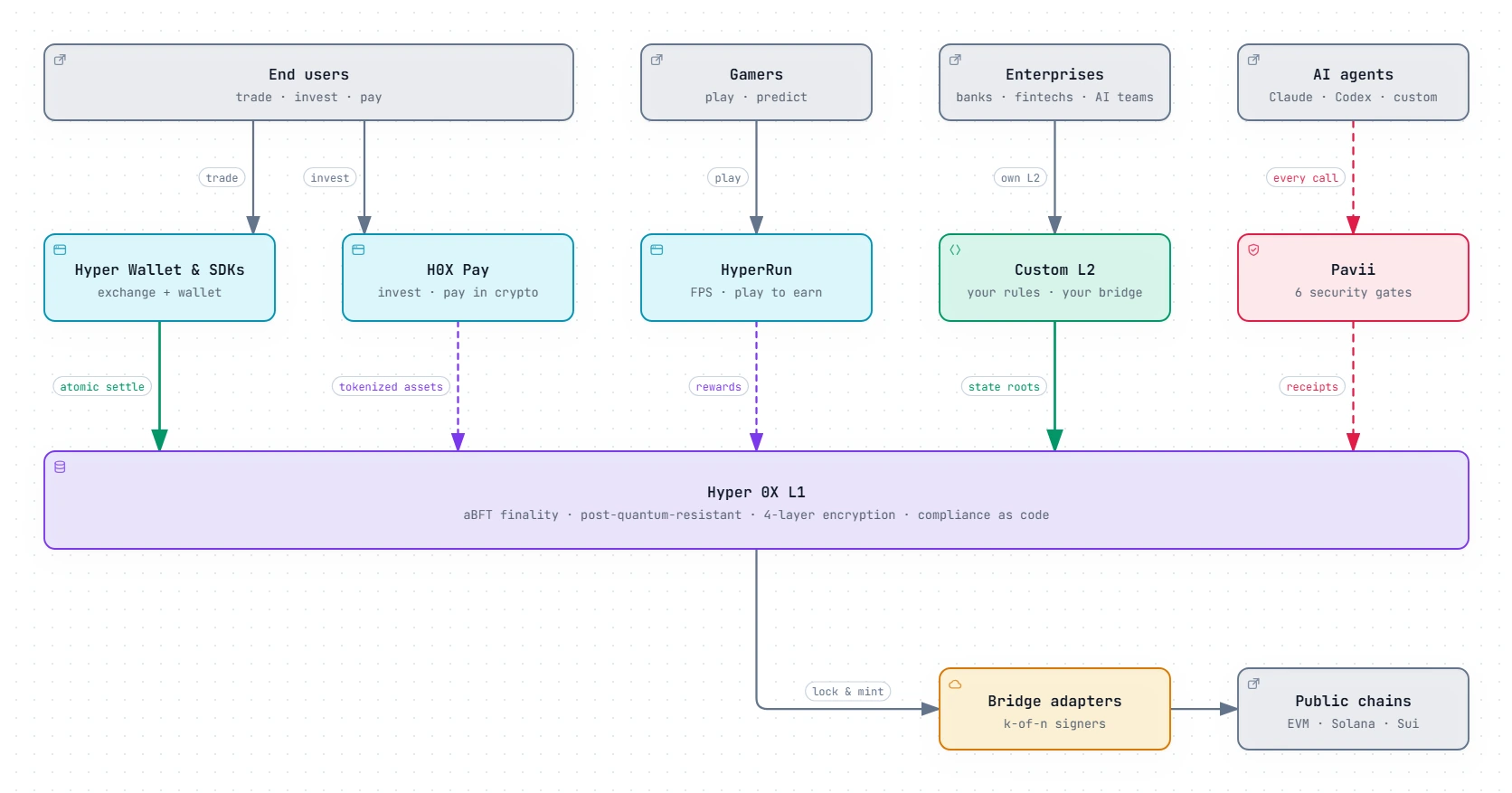
Architecture in detail
Frequently asked questions
Does a wallet SDK hold my customers' funds?
Not necessarily. A non-custodial SDK creates keys on the user's device, so neither you nor the provider can move their funds. Some SDKs, including the Hyper Wallet SDKs, also offer optional custody for clients who need it.
How long does it take to integrate a wallet SDK?
It depends on how many chains, assets and compliance rules you need. The usual first step is a focused pilot in one market with a few assets. A wider rollout follows when the pilot meets the success metrics that you agreed up front.
Can a wallet SDK be used inside a game?
Yes. Games use wallet SDKs to give players in-app wallets for rewards, items and payments without sending them to a separate app. The Hyper Wallet SDKs support in-app wallets and payments for games.
